> For the complete documentation index, see [llms.txt](https://docs.rome.builders/llms.txt). Markdown versions of documentation pages are available by appending `.md` to page URLs; this page is available as [Markdown](https://docs.rome.builders/zh/he-xin-gai-nian/token-interop.md).
# 代币互操作
ERC-20 和 SPL 代币如何在 Rome 上对应同一个底层账户。
Rome 将 ERC-20 代币及其底层 SPL 代币表示为一个共享账户。本页说明代币如何跨 EVM 和 Solana 运作。
## 共享状态模型
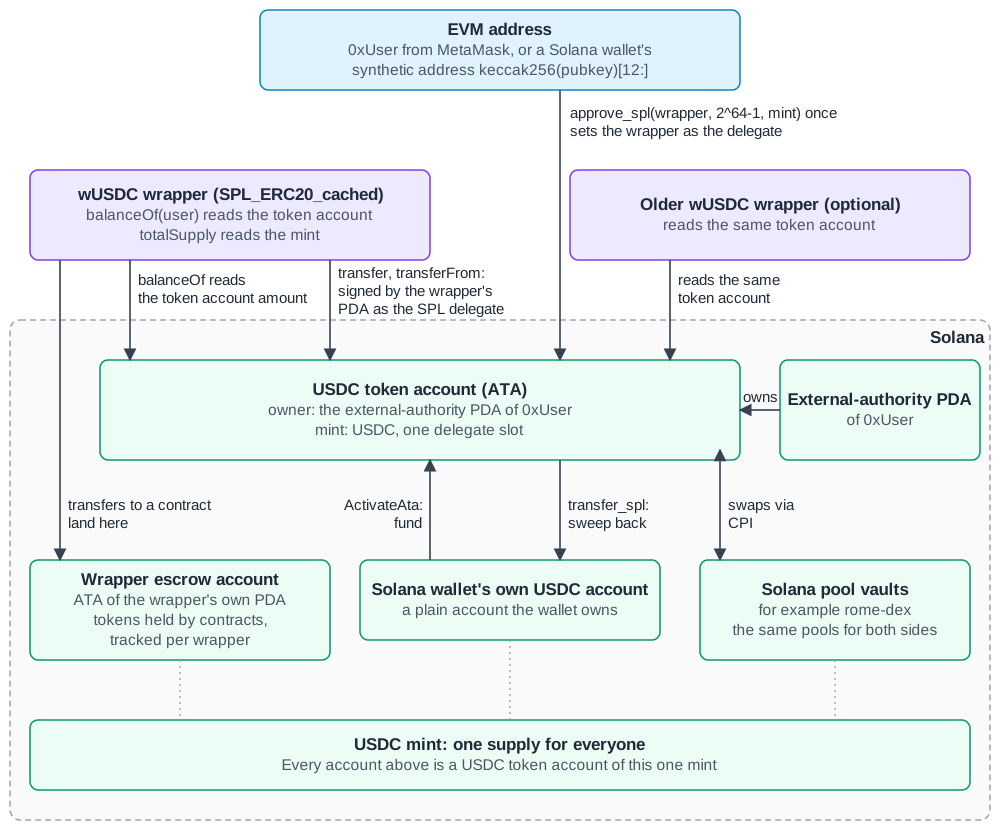
对于普通钱包,Rome 上的 ERC-20 代币是一个 **透明包装器** ,包装着 Solana 上的一个 SPL 代币账户。该钱包的 ERC-20 余额就是其 SPL 余额。该代币账户由针对 EVM 地址的程序派生地址拥有。这是它的 **外部权限 PDA**.
 * 无需桥接延迟:钱包的 ERC-20 余额就是其 SPL 余额。
* 普通钱包(包括 MetaMask 钱包和合成地址)不存在流动性碎片化。针对某个 mint 的每个包装器都会显示相同的钱包余额。 `balanceOf` 方法从钱包的代币账户读取该余额。EVM 合约中持有的代币按包装器分别持有(参见 [包装器合约](#the-wrapper-contract)).
* 对于钱包的代币,不存在一侧锁定、另一侧铸造的情况。由合约持有的代币位于包装器在 Solana 上自身的托管代币账户中。每个包装器独立追踪这些代币。
**为何第二个包装器不会拆分余额**
同一 mint 上的两个包装器会显示相同的钱包余额。包装器读取 `totalSupply` 自 Solana mint。在 Hadrian(测试网)上,三个 wUSDC 包装器返回了相匹配的钱包余额。三个 wUSDC 包装器(9.0.0、8.0.0 和 2026 年 5 月)均返回了 Solana mint 的供应量。
每个工厂允许每个 mint 有一个包装器。新版本的工厂可以为该 mint 部署另一个包装器。注册表会为每条链指定规范包装器。
直接持有 USDC 的 Solana 钱包和 EVM 地址持有同一 mint 的代币。Solana 流动性池对两者使用相同的金库和储备。
中的持有者表 [通过浏览器](/zh/rome-shang-de-ying-yong/via.md) 是根据每个包装器的 `Transfer` 事件构建的。它可能与代币账户余额不同,因为直接的 SPL 转账、 `ActivateAta`以及通过另一个包装器进行的转账不会出现在该包装器的事件中。
> 下面的导入路径使用 `@rome-protocol/rome-solidity`。该包不在 npm 上;请从公开 [`rome-solidity`](https://github.com/rome-protocol/rome-solidity) 仓库使用以下方式安装 `npm install github:rome-protocol/rome-solidity`,或 `forge install rome-protocol/rome-solidity` 并使用重映射;包装器和工厂合约在 Foundry 下也需要 OpenZeppelin(参见 [部署 Solidity 合约](/zh/kai-fa-zhe-zhi-nan/deploy-solidity.md#using-the-rome-solidity-sdk))。预编译接口位于 [`contracts/interface.sol`](https://github.com/rome-protocol/rome-solidity/blob/master/contracts/interface.sol).
## 包装器合约
`SPL_ERC20` (及其缓存轨道变体 `SPL_ERC20_cached`,工厂会为每个 mint 部署该变体,除非其具有已激活的转账钩子;参见 [Token-2022 mint](#token-2022-mints))在 SPL mint 之上提供完整的 ERC-20 接口:
* `balanceOf()` — 从 Solana 读取用户的 ATA 余额(对于合约地址,则读取包装器自身的账本,见下文)
* `transfer()` / `transferFrom()` — 在 Solana 上转移代币
* `approve()` / `allowance()` — 按支出者划分的 ERC-20 授权额度,保存在 EVM 存储中(SPL 代币账户没有 EVM 风格的授权额度)。它们与下文的一次性授权相互独立:若要转移用户的代币,包装器会作为该用户的 SPL 委托人,且用户每个钱包只需授予它一次该权限
* `totalSupply()` — 读取 SPL mint 的供应量
合约无法发送一次性授权,因此合约的代币保存在包装器自身的代币账户中,并由包装器的账本追踪。 `balanceOf(contract)` 读取该账本。
## 工厂
`ERC20SPLFactory` 可为任何 SPL mint 部署包装器:
```solidity
import {ERC20SPLFactory} from "@rome-protocol/rome-solidity/contracts/erc20spl/erc20spl_factory.sol";
// 部署包装器,从 mint 的 Token-2022 元数据或 Metaplex 加载名称/符号
address wrapper = factory.add_spl_token_with_metadata(splMint);
// 或手动指定名称/符号
address wrapper = factory.add_spl_token_no_metadata(splMint, "USD Coin", "USDC");
```
实时工厂地址,来自注册表的 `生效` 条目(v0.2.0):Hadrian `0x37c13e4ff21fb914eb24014dcbd0f8dbeaa31078`。较早的工厂仍在链上,但被标记为 `已弃用` 或 `已退役` 在 [registry](https://github.com/rome-protocol/rome-registry/tree/main/chains);请勿使用它们。注册表是权威来源,因此应从中读取实时地址(参见 [读取合约列表](/zh/can-kao/contract-addresses.md#reading-the-contracts-list)),而不是将地址复制到代码中。
## 规范 mint
不存在链上代币注册表合约。规范包装器和 gas/桥接代币在链下的 [`rome-protocol/registry`](https://github.com/rome-protocol/rome-registry)中维护;通过 `add_spl_token_no_metadata` 创建的无许可包装器可从链上的 `TokenCreated` 事件中发现。注册表会为每条链上的每个 mint 指定规范包装器。钱包余额在包装器之间共享。每个包装器独立追踪由 EVM 合约持有的余额。
## 从 Solidity 执行 SPL 操作
对于由用户 PDA 签名的 SPL 原语,请使用 **HelperProgram** 预编译(`0xFF…09`)— ATA 创建、SPL 转账以及 gas↔lamports 转换:
```solidity
import {IHelperProgram} from "@rome-protocol/rome-solidity/contracts/interface.sol";
IHelperProgram helper = IHelperProgram(0xFF00000000000000000000000000000000000009);
helper.create_ata(user, mint); // 为某个 mint 创建用户的 ATA
helper.transfer_spl(to, tokens, mint); // 从调用者的 PDA 转移 SPL
```
`transfer_spl` 具有多个重载(包括用于 `transferFrom` 流程的委托变体);请参阅 `interface.sol` 了解准确签名。在缓存轨道上,对应操作位于 `ISplCached` (`0xFF…05`)以及 `IAssociatedSplCached` (`0xFF…06`)。合约始终一致地使用其中一条轨道。
## 每个钱包一次性授权
包装器作为 **SPL 委托人** 来转移用户代币账户中的代币。因此,在包装器能够为钱包转移任何资产之前,钱包必须为每个包装器授予它一次该权限。授权是对 Helper 预编译的一次调用(`0xff00000000000000000000000000000000000009`):
```solidity
helper.approve_spl(wrapper, type(uint64).max, mint); // approve_spl(wrapper, 2^64-1, mint)
```
`approve_spl` 由用户自己的账户签名,因此应由用户发送,而非包装器或您的合约发送。mint 位于 `mint_id()` 包装器上。
* **谁需要它。** 每个 EVM 钱包,以及每个 Solana 用户的合成地址,对于其希望转移代币的每个包装器均需要。使用 `transferFrom` 拉取代币的合约仅适用于已向该包装器授予权限的用户。
* **如何检查。** 调用 `isEnabled(user)` 包装器上的该方法。它会返回 `true` ,表示授权已生效。
* **缺少授权时的表现。** 转账会因 SPL 错误而回滚 `0x4` (所有者不匹配)。
* **每个代币账户只能有一个委托人。** 一个 SPL 代币账户只有一个委托人。在同一代币账户上向另一个程序授予权限(例如桥或路由器)会替换包装器的授权,包装器将无法再为该用户工作,直到用户再次授予权限。请在转账前检查 `isEnabled` ,而不要假定先前的授权仍然存在。
当新的工厂版本替换包装器时,每个钱包通过 `approve_spl`向新包装器授予权限。旧包装器仅在它仍是该代币账户的委托人期间才能转移该钱包的代币。向新包装器授权会替换该委托人。
上面的 [双通道应用指南](/zh/kai-fa-zhe-zhi-nan/dual-lane-app.md#one-time-grant-the-wrapper) 包含两条通道的完整代码。
## 存入和提取
* **进入 EVM** — SPL 侧会向用户 PDA 所拥有的 ATA 记入余额;ERC-20 包装器会立即反映该余额。跨链入站转账通过用户在桥上签名的授权以无需信任的方式结算。
* **将 gas 包装为 gas 代币** — 调用 `提取` 预编译(`0x42…16`). `withdraw_to_ata(wei)` 会销毁原生 gas,并以 gas 代币自身的小数位数向调用者的代币账户记入等值金额;随后 gas 代币的包装器(例如 wUSDC)将其显示为余额。 `withdraw_to_pda(wei)` 向调用者的 PDA 支付 lamports,并且仅适用于 gas 为 SOL 的链;在使用 USDC 作为 gas 的 Hadrian 和 Rubicon 上会回滚,因此应使用 `withdraw_to_ata` 。金额以 18 位小数的 gas 单位表示,且必须为 gas 代币单位的整数:在以 USDC 为 gas 的链上必须是 10^12 的倍数(一个 6 位小数单位),否则调用会回滚。 `HelperProgram.deposit_from_ata(wei)` 则反向操作,将调用者代币账户中的 gas 代币转回原生 gas,并遵循相同的倍数规则。这些是 gas 代币转换,不是其他代币的退出途径。
* **转出至 Solana,任何其他代币** — 包装器自身的余额已经是 SPL 余额,因此转出时进行 SPL 转账即可:
* `HelperProgram.transfer_spl_to_signer(amount, mint)` 将调用者的代币发送到签署交易的 Solana 钱包的代币账户。此返回路径仅在由钱包签名的 Solana 通道上到达用户自己的钱包。若从 MetaMask 调用或通过中继调用,签名者是 Rome 的代理付款人,因此调用会失败或代币会转至 Rome。请改用 `transfer_spl` 或 `RomeBridgeWithdraw.bridgeOutToSolana` 。
* `RomeBridgeWithdraw.bridgeOutToSolana(solanaRecipient, amount, mint)` 会将其发送至任意 Solana 钱包。它需要用户向桥合约授予权限(`approve_spl(bridge, …)`,参见上文关于单一委托人的说明),并且接收方的代币账户必须存在; `ensureRecipientAta(solanaRecipient, mint)` 会创建它。
* `RomeBridgeWithdraw` 还会通过 CCTP 将 USDC 销毁并转至另一条链(`burnUSDC`),并通过 Wormhole 发送其他资产(`burnETH`, `burnToWormhole`).
请从注册表获取实时 `RomeBridgeWithdraw` 地址。
## Gas 代币
每条链都有自己的 gas 代币:SOL 或 SPL 代币。Rome Proxy 的价格来源可以是 Hermes API 价格源、Meteora DAMM v1 池、Meteora DAMM v2 池或固定价格。Hadrian(测试网)和 Rubicon(主网)使用 USDC。Hadrian 使用测试 USDC。Rubicon 使用真实 USDC。不存在通用的默认 gas 代币。
## Token-2022 mint
工厂也会包装 Token-2022 mint。它使用以下方式向 Helper 预编译查询 mint 信息: `mint_info(mint)` (选择器 `0xe24bf5d4`),并根据返回结果选择包装器。 `mint_info` 返回五个值:
| 值 | 含义 |
| -------------- | ------------------------------------------- |
| `tokenProgram` | 拥有该 mint 的代币程序(经典 SPL Token 程序或 Token-2022) |
| `decimals` | mint 的小数位数 |
| `hookProgram` | 转账钩子程序;没有钩子,或者钩子存在但未激活时为零 |
| `feeBps` | 以基点计的转账手续费;不存在或设为零时为零 |
| `extensions` | 该 mint 所带 Token-2022 扩展的位图,扩展类型 N 对应第 N 位 |
mint 会获得什么:
| Mint | 包装器 | `wrapper_kind_by_mint` |
| --------------------------------------------- | -------------------------------------------------------------------- | ---------------------- |
| 普通 mint、没有钩子的 Token-2022 mint,或钩子存在但未激活的 mint | 缓存包装器(`SPL_ERC20_cached`) | `1` |
| 具有已激活转账钩子的 Token-2022 mint | 钩子包装器(`SPL_ERC20_Token2022Hooked`),通过工厂的 `hooked_wrapper_deployer()` | `2` |
具有转账手续费的 mint 会获得缓存包装器,并且其 `Transfer` 事件报告的是扣除手续费后实际到账的金额,而非发送金额。您可以通过工厂读取 mint 所获得的类型: `wrapper_kind_by_mint(mint)`;在实时 Hadrian 工厂上,USDC、ETH 和 SOL 包装器均返回 `1`.
哪些情况会被拒绝:
* 具有已激活转账钩子的 mint 无法获得普通包装器。直接在其上部署 `SPL_ERC20` 或 `SPL_ERC20_cached` 会因以下错误回滚: `ArmedTransferHookUnsupported(mint, hookProgram)`。通过工厂时,此情形会改用钩子包装器。
* 不是 SPL mint 的地址会使 `mint_info` 因以下错误回滚: `无效的 SPL mint 账户:`.
* 已有包装器的 mint 会因以下错误回滚: `代币已存在`,而已被使用的符号会因以下错误回滚: `具有该符号的代币已存在`.
* `add_spl_token_with_metadata` 会先从 mint 自身的 Token-2022 元数据读取名称和符号,其次从 Metaplex 读取。若 mint 两者皆无,则会因以下错误回滚: `Mint 声明无名称:请使用 add_spl_token_no_metadata`.
钩子包装器的行为:
* Token-2022 会在每次转账时运行钩子,而钩子需要依赖于该转账的账户。包装器无法推导这些账户,因此调用者需从 mint 的 extra-account-metas 列表解析完整账户列表并将其传入。包装器会检查该列表的固定部分(钩子程序及其验证账户),并将其原样转发。
* 普通的 `transfer`, `transferFrom` 和 `bridgeOutToSolana` 因以下错误回滚: `HookAccountPlanRequired`。请使用 `transferWithHookAccounts`, `transferFromWithHookAccounts` 和 `bridgeOutToSolanaWithHookAccounts`,这些方法将账户列表作为额外参数接收。
* 若 mint 的钩子程序在包装器部署后发生变化,转账会因以下错误回滚: `HookConfigurationChanged`.
* 它通过直接跨程序调用和传统轨道转移代币,不使用缓存轨道。合约始终一致地使用一条轨道,且传统轨道上的调用仅在原子执行中运行,因此使用钩子包装器的调用必须能容纳于一笔原子交易中。
* 它不为合约余额维护账本。发送至合约的代币会进入合约自身的代币账户,且合约只有在向包装器本身作出 `approve_spl` 授权后才能继续发送这些代币。
* 它需要与其他任何包装器相同的 [一次性授权](#one-time-grant-per-wallet) 。
## 约束
* SPL 代币金额为 `uint64` (最大值为 18,446,744,073,709,551,615)
* ERC-20 授权额度(`approve` / `allowance`)存储在 EVM 中。包装器作为用户的 SPL 委托人转移代币,用户每个包装器只需授予一次该权限(参见 [每个钱包一次性授权](#one-time-grant-per-wallet))
* 每个工厂中的 ERC-20 包装器符号必须唯一
## 接下来
* [合约地址](/zh/can-kao/contract-addresses.md) — 预编译和每链地址
* [从 EVM 调用 Solana](/zh/kai-fa-zhe-zhi-nan/call-solana-from-evm.md) — 来自 Solidity 的 CPI 和 SPL 操作
* [Solana 与 EVM 如何在 Rome 上交汇](/zh/he-xin-gai-nian/how-solana-and-evm-meet.md)
* [集成 Solana 程序](/zh/kai-fa-zhe-zhi-nan/integrate-solana-program.md)
---
# Agent Instructions
This documentation is published with GitBook. GitBook is the documentation platform designed so that both humans and AI agents can read, navigate, and reason over technical content effectively. Learn more at gitbook.com.
## Querying This Documentation
If you need additional information that is not directly available in this page, you can query the documentation by asking a question.
Perform an HTTP GET request on the following URL with the `ask` and `goal` query parameters:
```
GET https://docs.rome.builders/zh/he-xin-gai-nian/token-interop.md?ask=&goal=
```
`ask` is the immediate question: it should be specific, self-contained, and written in natural language.
`goal` is what the user is ultimately trying to achieve, the reason they need the answer. Sharing it helps GitBook give you a better, more relevant answer. A goal is most helpful when it describes the outcome the user wants rather than restating the question. For example, with `ask=how do I create an API token`, a goal like `automate deployments from our CI pipeline` lets GitBook tailor the answer to that use case.
The response will contain a direct answer to the question and relevant excerpts and sources from the documentation.
Use this mechanism when the answer is not explicitly present in the current page, you need clarification or additional context, or you want to retrieve related documentation sections.
* 无需桥接延迟:钱包的 ERC-20 余额就是其 SPL 余额。
* 普通钱包(包括 MetaMask 钱包和合成地址)不存在流动性碎片化。针对某个 mint 的每个包装器都会显示相同的钱包余额。 `balanceOf` 方法从钱包的代币账户读取该余额。EVM 合约中持有的代币按包装器分别持有(参见 [包装器合约](#the-wrapper-contract)).
* 对于钱包的代币,不存在一侧锁定、另一侧铸造的情况。由合约持有的代币位于包装器在 Solana 上自身的托管代币账户中。每个包装器独立追踪这些代币。
**为何第二个包装器不会拆分余额**
同一 mint 上的两个包装器会显示相同的钱包余额。包装器读取 `totalSupply` 自 Solana mint。在 Hadrian(测试网)上,三个 wUSDC 包装器返回了相匹配的钱包余额。三个 wUSDC 包装器(9.0.0、8.0.0 和 2026 年 5 月)均返回了 Solana mint 的供应量。
每个工厂允许每个 mint 有一个包装器。新版本的工厂可以为该 mint 部署另一个包装器。注册表会为每条链指定规范包装器。
直接持有 USDC 的 Solana 钱包和 EVM 地址持有同一 mint 的代币。Solana 流动性池对两者使用相同的金库和储备。
中的持有者表 [通过浏览器](/zh/rome-shang-de-ying-yong/via.md) 是根据每个包装器的 `Transfer` 事件构建的。它可能与代币账户余额不同,因为直接的 SPL 转账、 `ActivateAta`以及通过另一个包装器进行的转账不会出现在该包装器的事件中。
> 下面的导入路径使用 `@rome-protocol/rome-solidity`。该包不在 npm 上;请从公开 [`rome-solidity`](https://github.com/rome-protocol/rome-solidity) 仓库使用以下方式安装 `npm install github:rome-protocol/rome-solidity`,或 `forge install rome-protocol/rome-solidity` 并使用重映射;包装器和工厂合约在 Foundry 下也需要 OpenZeppelin(参见 [部署 Solidity 合约](/zh/kai-fa-zhe-zhi-nan/deploy-solidity.md#using-the-rome-solidity-sdk))。预编译接口位于 [`contracts/interface.sol`](https://github.com/rome-protocol/rome-solidity/blob/master/contracts/interface.sol).
## 包装器合约
`SPL_ERC20` (及其缓存轨道变体 `SPL_ERC20_cached`,工厂会为每个 mint 部署该变体,除非其具有已激活的转账钩子;参见 [Token-2022 mint](#token-2022-mints))在 SPL mint 之上提供完整的 ERC-20 接口:
* `balanceOf()` — 从 Solana 读取用户的 ATA 余额(对于合约地址,则读取包装器自身的账本,见下文)
* `transfer()` / `transferFrom()` — 在 Solana 上转移代币
* `approve()` / `allowance()` — 按支出者划分的 ERC-20 授权额度,保存在 EVM 存储中(SPL 代币账户没有 EVM 风格的授权额度)。它们与下文的一次性授权相互独立:若要转移用户的代币,包装器会作为该用户的 SPL 委托人,且用户每个钱包只需授予它一次该权限
* `totalSupply()` — 读取 SPL mint 的供应量
合约无法发送一次性授权,因此合约的代币保存在包装器自身的代币账户中,并由包装器的账本追踪。 `balanceOf(contract)` 读取该账本。
## 工厂
`ERC20SPLFactory` 可为任何 SPL mint 部署包装器:
```solidity
import {ERC20SPLFactory} from "@rome-protocol/rome-solidity/contracts/erc20spl/erc20spl_factory.sol";
// 部署包装器,从 mint 的 Token-2022 元数据或 Metaplex 加载名称/符号
address wrapper = factory.add_spl_token_with_metadata(splMint);
// 或手动指定名称/符号
address wrapper = factory.add_spl_token_no_metadata(splMint, "USD Coin", "USDC");
```
实时工厂地址,来自注册表的 `生效` 条目(v0.2.0):Hadrian `0x37c13e4ff21fb914eb24014dcbd0f8dbeaa31078`。较早的工厂仍在链上,但被标记为 `已弃用` 或 `已退役` 在 [registry](https://github.com/rome-protocol/rome-registry/tree/main/chains);请勿使用它们。注册表是权威来源,因此应从中读取实时地址(参见 [读取合约列表](/zh/can-kao/contract-addresses.md#reading-the-contracts-list)),而不是将地址复制到代码中。
## 规范 mint
不存在链上代币注册表合约。规范包装器和 gas/桥接代币在链下的 [`rome-protocol/registry`](https://github.com/rome-protocol/rome-registry)中维护;通过 `add_spl_token_no_metadata` 创建的无许可包装器可从链上的 `TokenCreated` 事件中发现。注册表会为每条链上的每个 mint 指定规范包装器。钱包余额在包装器之间共享。每个包装器独立追踪由 EVM 合约持有的余额。
## 从 Solidity 执行 SPL 操作
对于由用户 PDA 签名的 SPL 原语,请使用 **HelperProgram** 预编译(`0xFF…09`)— ATA 创建、SPL 转账以及 gas↔lamports 转换:
```solidity
import {IHelperProgram} from "@rome-protocol/rome-solidity/contracts/interface.sol";
IHelperProgram helper = IHelperProgram(0xFF00000000000000000000000000000000000009);
helper.create_ata(user, mint); // 为某个 mint 创建用户的 ATA
helper.transfer_spl(to, tokens, mint); // 从调用者的 PDA 转移 SPL
```
`transfer_spl` 具有多个重载(包括用于 `transferFrom` 流程的委托变体);请参阅 `interface.sol` 了解准确签名。在缓存轨道上,对应操作位于 `ISplCached` (`0xFF…05`)以及 `IAssociatedSplCached` (`0xFF…06`)。合约始终一致地使用其中一条轨道。
## 每个钱包一次性授权
包装器作为 **SPL 委托人** 来转移用户代币账户中的代币。因此,在包装器能够为钱包转移任何资产之前,钱包必须为每个包装器授予它一次该权限。授权是对 Helper 预编译的一次调用(`0xff00000000000000000000000000000000000009`):
```solidity
helper.approve_spl(wrapper, type(uint64).max, mint); // approve_spl(wrapper, 2^64-1, mint)
```
`approve_spl` 由用户自己的账户签名,因此应由用户发送,而非包装器或您的合约发送。mint 位于 `mint_id()` 包装器上。
* **谁需要它。** 每个 EVM 钱包,以及每个 Solana 用户的合成地址,对于其希望转移代币的每个包装器均需要。使用 `transferFrom` 拉取代币的合约仅适用于已向该包装器授予权限的用户。
* **如何检查。** 调用 `isEnabled(user)` 包装器上的该方法。它会返回 `true` ,表示授权已生效。
* **缺少授权时的表现。** 转账会因 SPL 错误而回滚 `0x4` (所有者不匹配)。
* **每个代币账户只能有一个委托人。** 一个 SPL 代币账户只有一个委托人。在同一代币账户上向另一个程序授予权限(例如桥或路由器)会替换包装器的授权,包装器将无法再为该用户工作,直到用户再次授予权限。请在转账前检查 `isEnabled` ,而不要假定先前的授权仍然存在。
当新的工厂版本替换包装器时,每个钱包通过 `approve_spl`向新包装器授予权限。旧包装器仅在它仍是该代币账户的委托人期间才能转移该钱包的代币。向新包装器授权会替换该委托人。
上面的 [双通道应用指南](/zh/kai-fa-zhe-zhi-nan/dual-lane-app.md#one-time-grant-the-wrapper) 包含两条通道的完整代码。
## 存入和提取
* **进入 EVM** — SPL 侧会向用户 PDA 所拥有的 ATA 记入余额;ERC-20 包装器会立即反映该余额。跨链入站转账通过用户在桥上签名的授权以无需信任的方式结算。
* **将 gas 包装为 gas 代币** — 调用 `提取` 预编译(`0x42…16`). `withdraw_to_ata(wei)` 会销毁原生 gas,并以 gas 代币自身的小数位数向调用者的代币账户记入等值金额;随后 gas 代币的包装器(例如 wUSDC)将其显示为余额。 `withdraw_to_pda(wei)` 向调用者的 PDA 支付 lamports,并且仅适用于 gas 为 SOL 的链;在使用 USDC 作为 gas 的 Hadrian 和 Rubicon 上会回滚,因此应使用 `withdraw_to_ata` 。金额以 18 位小数的 gas 单位表示,且必须为 gas 代币单位的整数:在以 USDC 为 gas 的链上必须是 10^12 的倍数(一个 6 位小数单位),否则调用会回滚。 `HelperProgram.deposit_from_ata(wei)` 则反向操作,将调用者代币账户中的 gas 代币转回原生 gas,并遵循相同的倍数规则。这些是 gas 代币转换,不是其他代币的退出途径。
* **转出至 Solana,任何其他代币** — 包装器自身的余额已经是 SPL 余额,因此转出时进行 SPL 转账即可:
* `HelperProgram.transfer_spl_to_signer(amount, mint)` 将调用者的代币发送到签署交易的 Solana 钱包的代币账户。此返回路径仅在由钱包签名的 Solana 通道上到达用户自己的钱包。若从 MetaMask 调用或通过中继调用,签名者是 Rome 的代理付款人,因此调用会失败或代币会转至 Rome。请改用 `transfer_spl` 或 `RomeBridgeWithdraw.bridgeOutToSolana` 。
* `RomeBridgeWithdraw.bridgeOutToSolana(solanaRecipient, amount, mint)` 会将其发送至任意 Solana 钱包。它需要用户向桥合约授予权限(`approve_spl(bridge, …)`,参见上文关于单一委托人的说明),并且接收方的代币账户必须存在; `ensureRecipientAta(solanaRecipient, mint)` 会创建它。
* `RomeBridgeWithdraw` 还会通过 CCTP 将 USDC 销毁并转至另一条链(`burnUSDC`),并通过 Wormhole 发送其他资产(`burnETH`, `burnToWormhole`).
请从注册表获取实时 `RomeBridgeWithdraw` 地址。
## Gas 代币
每条链都有自己的 gas 代币:SOL 或 SPL 代币。Rome Proxy 的价格来源可以是 Hermes API 价格源、Meteora DAMM v1 池、Meteora DAMM v2 池或固定价格。Hadrian(测试网)和 Rubicon(主网)使用 USDC。Hadrian 使用测试 USDC。Rubicon 使用真实 USDC。不存在通用的默认 gas 代币。
## Token-2022 mint
工厂也会包装 Token-2022 mint。它使用以下方式向 Helper 预编译查询 mint 信息: `mint_info(mint)` (选择器 `0xe24bf5d4`),并根据返回结果选择包装器。 `mint_info` 返回五个值:
| 值 | 含义 |
| -------------- | ------------------------------------------- |
| `tokenProgram` | 拥有该 mint 的代币程序(经典 SPL Token 程序或 Token-2022) |
| `decimals` | mint 的小数位数 |
| `hookProgram` | 转账钩子程序;没有钩子,或者钩子存在但未激活时为零 |
| `feeBps` | 以基点计的转账手续费;不存在或设为零时为零 |
| `extensions` | 该 mint 所带 Token-2022 扩展的位图,扩展类型 N 对应第 N 位 |
mint 会获得什么:
| Mint | 包装器 | `wrapper_kind_by_mint` |
| --------------------------------------------- | -------------------------------------------------------------------- | ---------------------- |
| 普通 mint、没有钩子的 Token-2022 mint,或钩子存在但未激活的 mint | 缓存包装器(`SPL_ERC20_cached`) | `1` |
| 具有已激活转账钩子的 Token-2022 mint | 钩子包装器(`SPL_ERC20_Token2022Hooked`),通过工厂的 `hooked_wrapper_deployer()` | `2` |
具有转账手续费的 mint 会获得缓存包装器,并且其 `Transfer` 事件报告的是扣除手续费后实际到账的金额,而非发送金额。您可以通过工厂读取 mint 所获得的类型: `wrapper_kind_by_mint(mint)`;在实时 Hadrian 工厂上,USDC、ETH 和 SOL 包装器均返回 `1`.
哪些情况会被拒绝:
* 具有已激活转账钩子的 mint 无法获得普通包装器。直接在其上部署 `SPL_ERC20` 或 `SPL_ERC20_cached` 会因以下错误回滚: `ArmedTransferHookUnsupported(mint, hookProgram)`。通过工厂时,此情形会改用钩子包装器。
* 不是 SPL mint 的地址会使 `mint_info` 因以下错误回滚: `无效的 SPL mint 账户:`.
* 已有包装器的 mint 会因以下错误回滚: `代币已存在`,而已被使用的符号会因以下错误回滚: `具有该符号的代币已存在`.
* `add_spl_token_with_metadata` 会先从 mint 自身的 Token-2022 元数据读取名称和符号,其次从 Metaplex 读取。若 mint 两者皆无,则会因以下错误回滚: `Mint 声明无名称:请使用 add_spl_token_no_metadata`.
钩子包装器的行为:
* Token-2022 会在每次转账时运行钩子,而钩子需要依赖于该转账的账户。包装器无法推导这些账户,因此调用者需从 mint 的 extra-account-metas 列表解析完整账户列表并将其传入。包装器会检查该列表的固定部分(钩子程序及其验证账户),并将其原样转发。
* 普通的 `transfer`, `transferFrom` 和 `bridgeOutToSolana` 因以下错误回滚: `HookAccountPlanRequired`。请使用 `transferWithHookAccounts`, `transferFromWithHookAccounts` 和 `bridgeOutToSolanaWithHookAccounts`,这些方法将账户列表作为额外参数接收。
* 若 mint 的钩子程序在包装器部署后发生变化,转账会因以下错误回滚: `HookConfigurationChanged`.
* 它通过直接跨程序调用和传统轨道转移代币,不使用缓存轨道。合约始终一致地使用一条轨道,且传统轨道上的调用仅在原子执行中运行,因此使用钩子包装器的调用必须能容纳于一笔原子交易中。
* 它不为合约余额维护账本。发送至合约的代币会进入合约自身的代币账户,且合约只有在向包装器本身作出 `approve_spl` 授权后才能继续发送这些代币。
* 它需要与其他任何包装器相同的 [一次性授权](#one-time-grant-per-wallet) 。
## 约束
* SPL 代币金额为 `uint64` (最大值为 18,446,744,073,709,551,615)
* ERC-20 授权额度(`approve` / `allowance`)存储在 EVM 中。包装器作为用户的 SPL 委托人转移代币,用户每个包装器只需授予一次该权限(参见 [每个钱包一次性授权](#one-time-grant-per-wallet))
* 每个工厂中的 ERC-20 包装器符号必须唯一
## 接下来
* [合约地址](/zh/can-kao/contract-addresses.md) — 预编译和每链地址
* [从 EVM 调用 Solana](/zh/kai-fa-zhe-zhi-nan/call-solana-from-evm.md) — 来自 Solidity 的 CPI 和 SPL 操作
* [Solana 与 EVM 如何在 Rome 上交汇](/zh/he-xin-gai-nian/how-solana-and-evm-meet.md)
* [集成 Solana 程序](/zh/kai-fa-zhe-zhi-nan/integrate-solana-program.md)
---
# Agent Instructions
This documentation is published with GitBook. GitBook is the documentation platform designed so that both humans and AI agents can read, navigate, and reason over technical content effectively. Learn more at gitbook.com.
## Querying This Documentation
If you need additional information that is not directly available in this page, you can query the documentation by asking a question.
Perform an HTTP GET request on the following URL with the `ask` and `goal` query parameters:
```
GET https://docs.rome.builders/zh/he-xin-gai-nian/token-interop.md?ask=&goal=
```
`ask` is the immediate question: it should be specific, self-contained, and written in natural language.
`goal` is what the user is ultimately trying to achieve, the reason they need the answer. Sharing it helps GitBook give you a better, more relevant answer. A goal is most helpful when it describes the outcome the user wants rather than restating the question. For example, with `ask=how do I create an API token`, a goal like `automate deployments from our CI pipeline` lets GitBook tailor the answer to that use case.
The response will contain a direct answer to the question and relevant excerpts and sources from the documentation.
Use this mechanism when the answer is not explicitly present in the current page, you need clarification or additional context, or you want to retrieve related documentation sections.